
Installation & Setup
Will installing the Universal JavaScript snippet break my existing forms?
No. The Universal JS is backward-compatible with the older analytics.js snippet and both can co-exist. Old per-form embed codes will also continue to function independently.
I have both an old per-form snippet and the Universal JS on my site. Will my form show twice?
Yes, if both point to the same form. Remove the old per-form embed code once you have installed the Universal JS snippet to avoid duplicate display.
How do I publish my form through an IFrame?
Copy the pattern below and replace the placeholder with your own form link:
<iframe src="YOUR_FORM_LINK_HERE" width="100%" height="600" frameborder="0" scrolling="auto"></iframe>
Replace YOUR_FORM_LINK_HERE with your form's hosted URL, then paste the snippet into your site's HTML where you want the form to appear.
AI Builder Behavior
Can I use the AI builder to update a form I already created?
If the form was initially created in the AI signup form builder - yes. Open any existing form in the builder and continue the conversation with the AI assistant to make changes. Your form's current state is used as context for the session.
If the form was created in the drag and drop signup form builder, then it's best to copy your existing form's HTML or take a screenshot of the form and paste it into your prompt so that the AI agent can help build a new form using your existing form.
Does the AI remember my previous conversation when I come back to edit a form?
Partially. The AI understands the current state of your form design when you return, but the prior chat message history is not displayed. You may need to re-describe changes you want to make, but the AI already knows what your form looks like.
Can I upload an image to inspire my form design?
Yes. You can upload a screenshot of any form you like, and the builder will use it as a reference to create a similar design.
Configuration
How do I set up a redirect after someone submits my form?
Tell the AI assistant in the chat. For example: "Redirect subscribers to https://mysite.com/thank-you after they sign up." The redirect is configured conversationally through the AI assistant.
How do I apply a tag to subscribers who sign up through this form?
Ask the AI in the chat. For example: "Apply the tag 'free-guide' to anyone who signs up through this form." There is no dedicated tagging UI; it is handled through conversation. The tag will be applied automatically on signup once the form is published.
How do I add ad tracking to my sign up form?
Ask the AI assistant in the chat. For example: "Add ad tracking to this form so I can identify where signups came from." The AI will configure an ad tracking value for the form, which you can reference later when reviewing subscriber sources.
Can subscribers sign up again to have additional tags applied?
Yes. Any tags applied to a form are automatically appended when a subscriber signs up again, so no additional configuration is needed to apply a new tag on re-signup.
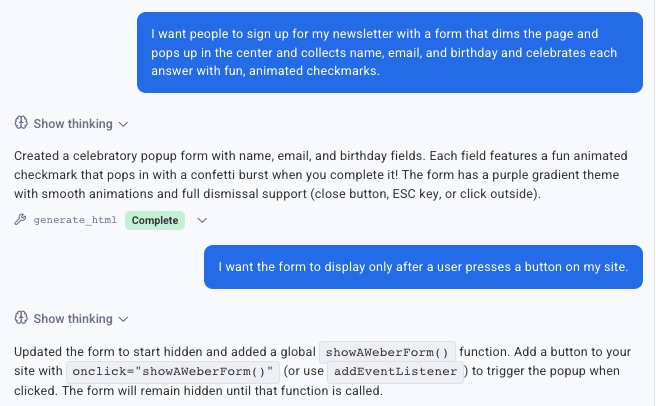
Can my form display when a button is on my site is pressed?
Yes. Just ask the AI in the chat, and it will help format your form to display on button press. It will also provide the code that needs to be included on your button.
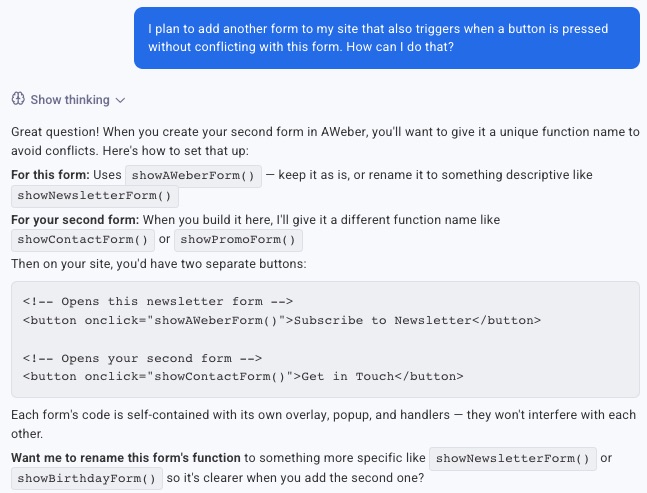
Can I add 2 forms that trigger when a button is pressed?
Yes. Just ask the AI in the chat, and it will provide instructions on how to accomplish this for the form you’re working with.
Thank You Pages
How do I set or change my Thank You page?
Tell the AI Signup Form Builder chat what you want, for example: "Set my Thank You page to [your URL]." The builder will configure it for you.
Can I send subscribers to different thank you pages based on an answer they give?
Yes. Describe the logic to the AI assistant in the chat. For example: "Create a form with different thank you pages based on a selection field. The field will be for if users prefer cats or dogs. Cats thank you page: https://example.com/welcome?p=cats. Dogs thank you page: https://example.com/welcome?p=dogs." The AI will configure the selection field and the matching redirects.
How do I display a subscriber's information on my thank you page?
Ask the AI assistant in the chat. For example: "Build me a thank you page for users that sign up for pet-sitting services. The sign up page will pass a UTM parameter (utm_name). I want the thank you page to display that name on the page." The AI will configure the form to pass and display the requested data.
How do I pass form data to my thank you page?
Ask the AI assistant in the chat. For example: "Update the form so that the subscriber's name is passed to the thank you page at the end of the URL." Once configured, the submitted information appears in the thank you page's URL and can be displayed or used by scripts on that page.
Fields & Custom Data
What if I want to collect information beyond just an email address?
The builder supports custom fields. Ask the AI to add fields for name, phone number, company, or any other information you need. If a matching custom field already exists in your account, the builder will use it. If not, it will create a new one when you publish.
Is there a limit to how many custom fields I can have?
AWeber accounts support up to 25 custom fields. The AI builder will warn you when you are approaching this limit and link you to the custom field management page.
Can I add a hidden field with a fixed value to my form?
Yes. Ask the AI assistant in the chat. For example: "Add a hidden custom field to my form with a static value. The field name is 'referral ID' and the value is '12345'." Every subscriber who submits the form will have that value saved automatically, without needing to enter anything themselves.
Can I split the name field into first and last name?
Yes. Ask the AI assistant in the chat to split the name field into separate first and last name fields. The builder will handle this automatically. You no longer need to manually recreate the name field to capture first and last names separately.
What is my form ID?
To obtain your form ID, ask the AI Signup Form Builder chat directly: “What is my form ID” and it will return it for you.
Display & Appearance
How do I change my sign up form submit button?
Tell the builder what you want the button to say or look like, for example: "Make my submit button say 'Get Instant Access', round the corners, and set it to teal. When someone hovers over it, have it darken slightly and grow a little, and give it a quick bounce animation when clicked." The AI Signup Form Builder will update the button accordingly.
Why does my form look different on my site than in the preview?
Your website's existing CSS (the styles that control fonts, colors, spacing, and layout) can interact with your form's design. If your site uses a theme or custom stylesheet, some of those styles may override parts of your form's appearance. If you notice differences, try asking the AI assistant to adjust the form's styles to be more specific, or contact our support team for help.
Can I have multiple forms on my site at the same time?
Yes. Your AWeber Javascript snippet loads all of your active published forms based on the display settings configured for each one. You can run different forms on different pages, or stack multiple forms on a single page.
Can I control when and how often my form appears?
Yes, through Display Settings. You can configure which pages the form appears on (all pages, specific pages, or excluded pages), how often it shows (every visit, once per visitor, once per session, or on a custom schedule), which devices it targets (all, desktop only, or mobile only), and start and end dates.
Can I turn off a form without removing the JavaScript snippet from my site?
Yes. Each form has a global on/off toggle in the builder. Disabling it prevents the form from loading on your site without requiring any code changes.
Why does pressing Tab jump between forms instead of moving to the next field?
This can happen when more than one form appears on the same page and their field order overlaps. Ask the AI assistant to adjust the field order (tab order) of your forms so that pressing Tab moves through each form's fields in sequence before jumping to the next form.
How do I get a basic, unformatted form?
Ask the builder for an unstyled version, for example: "Give me a basic, unstyled version of this form with no design applied." The AI Signup Form Builder will generate plain HTML you can style yourself.
Security & Compliance
Does AWeber support HTTPS/SSL sign up forms?
Yes. Publishing an AI signup form to an HTTPS/SSL site does not affect the site's security. Most websites use HTTPS today, and AWeber forms fully support HTTPS/SSL submissions. As a best practice, do not use your sign up form to collect sensitive information such as passwords, credit card numbers, or social security numbers.
Does my sign up form's code comply with W3C standards?
If you need to confirm W3C compliance, copy your form's published code and check it with a W3C validator. If the checker flags issues, ask the AI agent to adjust the form's code to be W3C compliant.
Split Testing
Can I A/B test my forms?
Split testing is not currently available for AI signup forms. Signup forms created using the Drag and Drop signup form editor can be split tested.