
In this article, we will walk through how to change your billing address and the address that appears in your messages.
To change your billing address
-
Access the My Account section of your control panel. This is where you will be able to edit the contact information that we use to reach you about your account - this is not the information that your subscribers see.
-
As you scroll down the page, you can edit the postal address that we have on file for billing and other postal mail notifications regarding your account - make sure that you check this mailing address regularly.
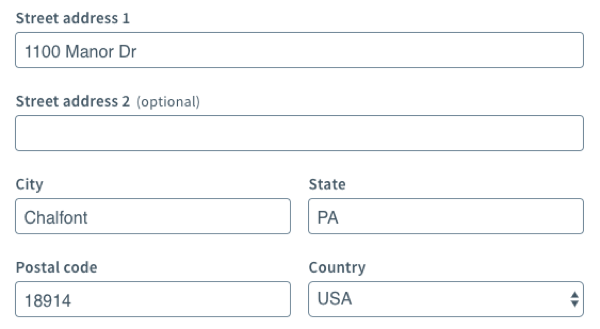
Hit "Save" at the bottom of the page to save any changes that you make.
-
From the left-hand side of the page, click Notifications.
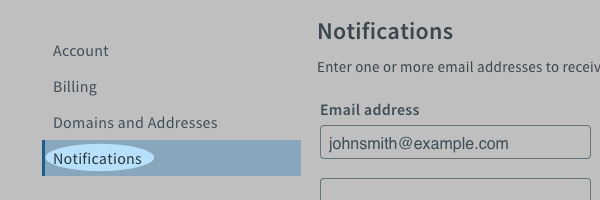
Here, you can add or edit email addresses to be notified about your account. You can choose to have separate addresses for billing or other news about your account. Simply check the appropriate boxes, then click "Save."
To change the address that appears in your messages
-
To edit information that your subscribers see in your messages, choose List Settings under the List Options tab.
-
Here, you can edit the contact address that will appear when you send an email, as well as the postal address that is displayed at the bottom of your messages.
Click the "Use Different Address" option to update your list's contact address, but keep in mind that due to US federal law under the CAN-SPAM Act, this must be a valid postal address at which you can be reached.

After clicking the "Use Different Address" link, a form will appear where you can add the updated address or use a different address.

Enter the address you want to use, and then click "Save List Settings” in the lower right hand corner of the screen.
Note: If your address is not entered properly, you may receive an error stating that it is not a valid address. Make sure that the address you’re entering has proper formatting and is a valid address where you can receive postal mail. If the address is entered properly and is not accepted, check your address online or reach out to your local post office to ensure that the address is formatted correctly.
Congratulations! Now you know how to change the contact information in your AWeber account.
Can I remove the address?
No. Due to US federal law under the CAN-SPAM Act, the contact address must be present and also be a valid postal address at which you can be reached.
Having trouble adding your address?
If your address is not accepted, you will receive a “Different Address Needed” error message.
You will want to ensure that the address you're adding is the address where you can receive postal mail.
Make sure the formatting of your mailing address is accurate as different formatting, abbreviations, etc. can invalidate an address. A good way to check would be to take your address and add it to a 3rd party maps website like Google Maps.
If your formatting changes, try adding your address using the format provided from the 3rd party map website.