
Before You Do!
We'd hate to see you leave! Were you having trouble setting up your account?
Did you know that all you need to do to start seeing results is publish a sign-up form on your website and add a few messages to your list?
We offer a Hold Package at $4.99/month. Any outstanding balance must be paid before the hold begins. While your account is on hold:
-
All account data is stored (subscribers, broadcasts, automations, landing pages, and web push notifications)
-
Workflow automations and broadcast sending are temporarily deactivated
-
New subscribers cannot be collected
-
You can reactivate anytime by contacting Customer Solutions with your login email, invoice number, and desired plan
Have you contacted our Solutions Team? We have real, live people ready to help you set up. We take a personal approach with our customers and would be glad to assist you with any questions or issues you're facing. Get in touch; we'd love to help.
We also offer a variety of video guides on our YouTube Channel, including a walk-through on how to get started, hosted by our experienced Education Team.
Still Want to Cancel?
We'd greatly appreciate your feedback on why you decided to cancel, as it helps us improve our service. The online cancellation process includes spots for your specific feedback, which we use to drive changes and enhancements.
Step By Step Instructions
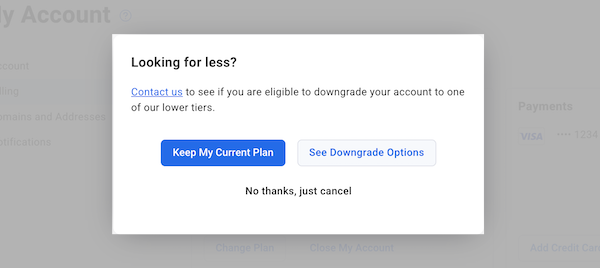
Follow the prompts on the screen to close out your account or start a live chat with us to request a cancellation. If you created your AWeber account using a social login option (like Google), you may not have set a traditional password. To resolve this:
-
Go to the AWeber login page
-
Click "Forgot Password"
-
Enter your AWeber account email address
-
Check your email and follow the link to create a new password
-
Return to the cancellation prompt to authorize your new password
Important: Creating a password doesn't remove your social login access. You'll be able to log in to AWeber using either:
-
Your social login
-
Your email and the new password you just created
We certainly welcome your business again in the future, and would be happy to answer any questions about how you might best use our service for the meantime.
Important Note About Overdue Balances
If you currently have an overdue balance on your account, you'll need to settle the outstanding payment before you can access the option to make changes to your current plan.
To resolve an overdue balance:
-
Navigate to your Billing section by clicking on your user profile in the bottom-left corner of your control panel and selecting My Account
-
From the left-hand side menu, click Billing
-
Review any outstanding balance displayed on your billing page
-
Update your payment method or make a payment to bring your account current
-
Once the payment is processed, the option to "Close My Account" or "Change Plan" will become available in the Current Plan section
Once your balance is current, you'll be able to proceed with canceling your account or making any other plan changes as needed.
Need to reactivate your closed or paused account?
Within 30 days of closing, we can reactivate your account. If your account was placed on our hold package, we can reactivate that too. Please contact our Customer Solutions team to further discuss your account.
After canceling your AWeber account, all information will be completely erased from your account within 30 days of closing if you do not choose to switch to a Hold package. After 30 days, the account cannot be reopened and the information will be permanently unavailable. If you anticipate the need to access your account in the future, consider taking advantage of the Hold package.
Security Verification for Account Cancellation
Before AWeber can proceed with the cancellation of your account, you will be required to provide security verification. This could include verifying your login email address and an invoice number or security questions set for your account. This information is required for security purposes. This step ensures that only authorized users can make significant changes to the account.
Need to cancel an AWeber free account?
Free AWeber accounts are not billed, so there's no risk of being charged if you keep your account open. If you'd still like to cancel, please reach out to our Customer Solutions team. You'll be asked to verify your account before we process the cancellation.