
If your state requires companies like AWeber to collect sales tax, you’ll see tax on your billing estimates and invoices.
If you qualify for sales tax exemption, you can request to have AWeber remove sales tax from your account. Here's what you need to know.
Disclaimer: This article is for informational purposes only and does not constitute tax advice. Please consult with a tax professional or your state's department of revenue for guidance specific to your situation.
Important: Having 501(c) status from the IRS does not automatically exempt you from state sales tax. Each state has its own exemption requirements.
Who May Qualify Certain nonprofit, educational, religious, charitable, and government organizations may be exempt from sales tax in their state. AWeber determines your tax obligation based on your billing address.
How to Request Exemption Submit a sales tax exemption certificate for your state to our billing team. Documentation requirements vary by state. Please contact your state's department of revenue to determine what certificate your organization needs.
To submit your exemption request:
-
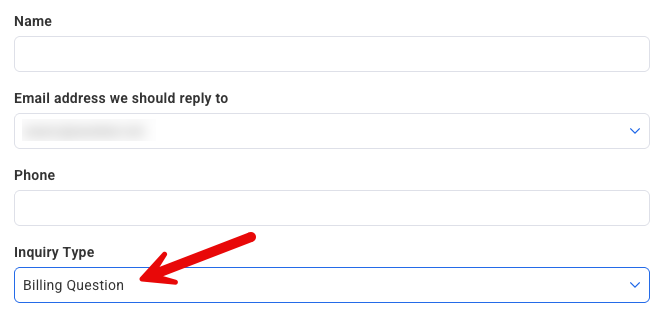
Submit a request that includes your state-issued sales tax exemption certificate through the AWeber Contact Form, selecting “Billing Question” as the Inquiry Type.
-
AWeber will review and follow up as needed.
Once approved, the exemption will be automatically applied to your account.
If you're unsure whether your organization qualifies or which documentation your state requires, contact your tax advisor or your state's department of revenue.