
You can view each subscriber's ad tracking category in the "Subscribers" page of your account. You can also view a breakdown of Ad Tracking Categories at your "Reports" page.
To See Your Subscribers' Ad Tracking Categories
-
Go to the "Subscribers" page to view your whole list. You can also enter some search terms first to find particular subscribers quickly. Click on the email address of the subscriber that you would like to see their ad tracking value for.

-
Under "Subscriber Information" you will see their ad tracking value on the left side of the page.
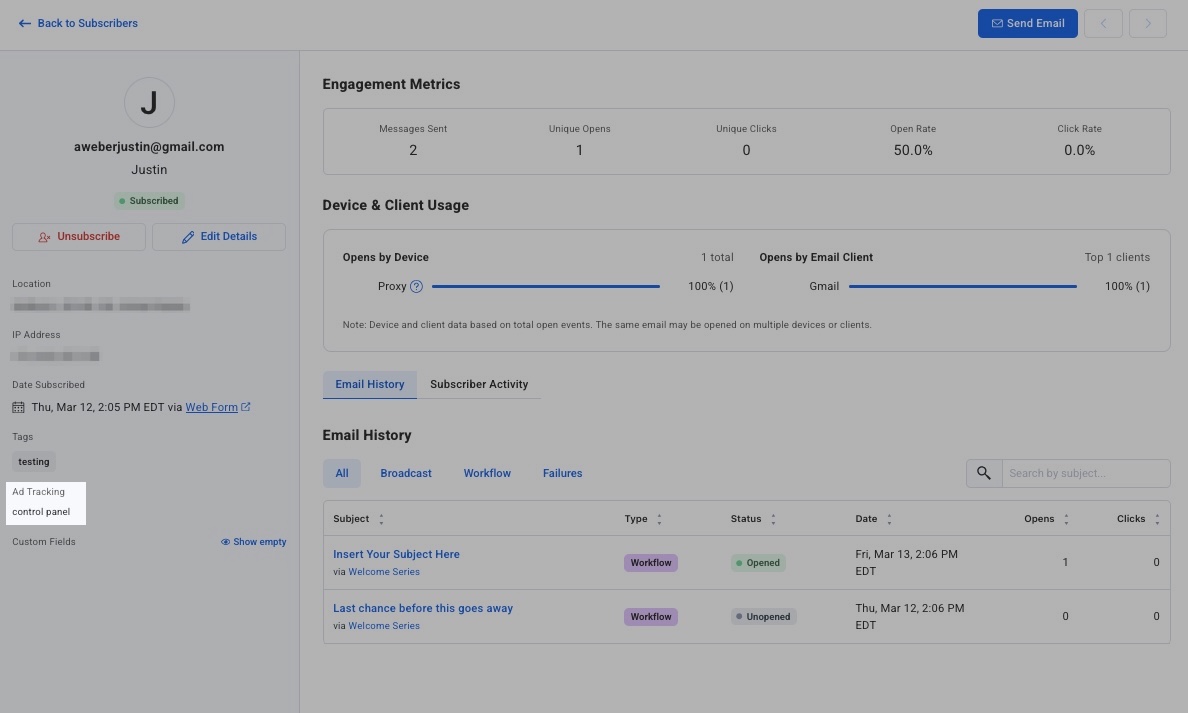
Note: you can manually edit the ad tracking value by clicking “Edit Details” at the top of the subscriber’s information. After making any edits, make sure to press “Save” at the bottom to save your changes.
-
To find a group of subscribers with the same ad tracking value you can you do a search based on what would be in the ad tracking field using the filter menu on the top of the "Subscribers" page. Once you type in the ad tracking value you want to search for just click "Apply Filter."
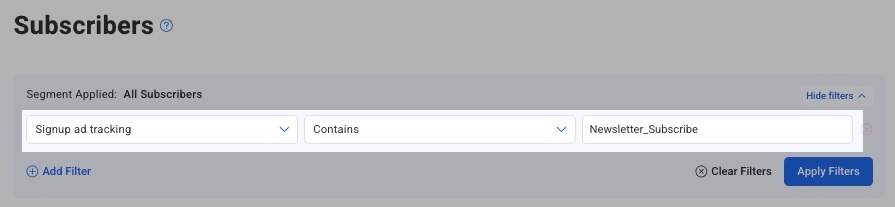
You will now see a list of all subscribers with the ad tracking value that you had searched for.