
Ad tracking values and tags both help you see where subscribers came from and send them the right messages. You can add either one to a Signup Form or Landing Page by asking the builder chat.
Ad Tracking
Adding an Ad Tracking Value: Open your Signup Form or Landing Page and ask the builder chat to set an ad tracking value. Example: "Set the ad tracking value to ebook_offer."
Use Cases:
-
Track which subscribers signed up through a particular Signup Form or Landing Page.
-
Example: Two offers send subscribers to the same list (an eBook and a branded template).
-
Each form or landing page has its own ad tracking value.
-
Both groups of subscribers receive the same messages.
-
You can send broadcasts to each group on its own using segments.
-
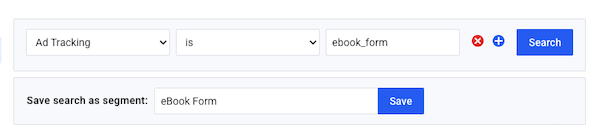
Creating Segments: Create segments from the "Subscribers" page using ad tracking values.
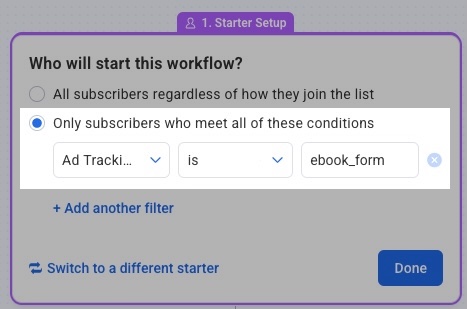
Triggering Workflows: Trigger Workflows based on an ad tracking value by adding a filter to the "on subscribe" trigger.
Tags
Flexibility: Tags give you more options than ad tracking values and are more commonly used to trigger Workflows.
Ways to Add Tags:
-
Ask the builder chat in your Signup Form or Landing Page. Example: "Add the tag ebook to this form."
-
Add tags from the "Subscribers" page.
-
Update tags in bulk on the "Subscribers" page.
-
Use an API integration.
-
Use the import feature.
Workflow Capabilities:
-
Trigger Workflows based on tags.
-
Control exactly which messages subscribers receive.
-
Move subscribers between Workflows using tags.
-
Continue a specific message series based on how a subscriber signed up.
Segmentation: Create segments with tags and send broadcasts directly to tagged segments.
Why Use Tags
Tracking and Targeting: Tags let you track and target subscribers based on their content preferences.
-
Example: Ask the builder chat to add a "Favorite animal" field to your Signup Form and tag subscribers based on their answer.
-
Send related content based on each tag.
-
Move subscribers to a general Workflow after the specific content is delivered.
-
Advantages:
-
More flexible subscriber management
-
More control over message delivery
-
Easy movement between Workflows
-
Content delivery based on subscriber behavior