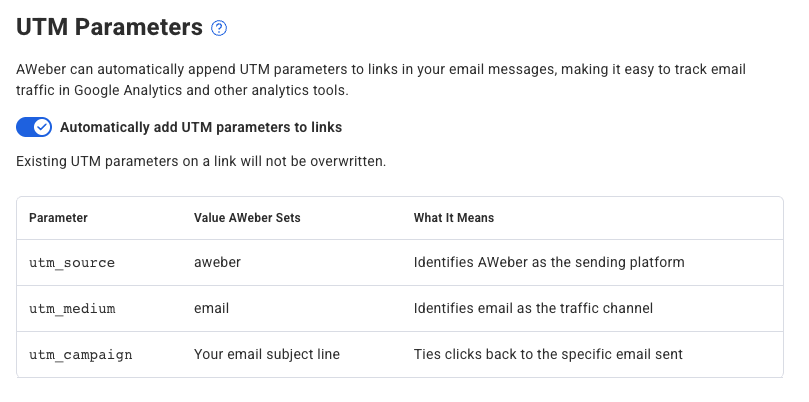
AWeber automatically adds UTM tracking parameters to links in your email messages. This means every click from your emails shows up in Google Analytics (or your analytics tool of choice) labeled and organized by campaign, so you can see exactly which emails are driving traffic to your site.
No setup is required. This feature is on by default for all AWeber accounts.
What are UTM parameters?
UTM parameters are short tags added to the end of a URL that tell your analytics tool where a visitor came from. For example, they can tell Google Analytics that a visitor came from your AWeber email, and which specific email brought them there.
What AWeber adds to your links
When AWeber sends your email, it automatically appends the following parameters to links in your broadcasts and workflow messages:
|
Parameter |
Value AWeber Sets |
What It Means |
|---|---|---|
|
utm_source |
aweber |
Identifies AWeber as the sending platform |
|
utm_medium |
|
Identifies email as the traffic channel |
|
utm_campaign |
Your email subject line |
Ties clicks back to the specific email sent |
The utm_campaign value is especially useful. Because it's based on your subject line, each email you send gets its own campaign label in your analytics, making it easy to compare performance across messages.
Already using your own UTM parameters?
If a link already has any UTM parameters on it, even just one, AWeber will leave that link completely unchanged. No parameters will be added, removed, or modified.
For example, if a link has only utm_campaign set, AWeber will not add utm_source or utm_medium. The link stays exactly as you built it.
AWeber only adds UTM parameters to links that have none at all.
Does my website need to support UTM parameters?
Most websites handle UTM parameters automatically — they simply ignore the extra values in the URL and load the page as normal. However, some websites are configured in a way that causes them to reject or break on URLs that include query strings (the ?key=value portion of a URL).
If AWeber detects that your link stops working when UTM parameters are added, you'll see a warning in the message editor. This means your site may need to be updated to accept query string values.
AWeber isn't alone here. Many other platforms and tools — including Google Ads, Facebook, Mailchimp, HubSpot, and link shorteners like Bitly — also append query parameters to URLs for tracking purposes. A website that rejects query strings will break links from all of these platforms, not just AWeber. Fixing your site to support query strings will improve compatibility across the web.
If you're not sure how to update your site, contact your web developer or hosting provider and let them know your site needs to support URLs with query string parameters.
Where to see this data
In Google Analytics, go to "Reports," then "Acquisition," then "Traffic acquisition." Filter by source/medium and look for aweber / email to see traffic from your emails. For a breakdown by individual email, look at the campaign report to see each subject line listed separately.
How to turn this feature On/Off
You may visit your AWeber List settings page to turn this feature On or Off anytime you like. Simply flip the toggle switch.